
Rewrite rules loopback requests (fdp-refilling-rules)
Summary
If your server logs show repeated requests like:
/?fdp-refilling-rules=1&action=deactivate&plugin=none&t=[timestamp]
with user agent WordPress/..., those are loopback requests fired by FDP itself, not by real visitors or bots.
FDP uses them to rebuild WordPress rewrite rules safely when another plugin or theme flushes them during a normal page load.
Under normal conditions this should happen occasionally, not continuously. A 24/7 loop almost always means another plugin is repeatedly flushing rewrite rules, and FDP is reacting each time.
What are rewrite rules?
WordPress stores rewrite rules in the database so pretty URLs (for example /about/) map to the correct content.
Plugins and themes can add their own rules. Those rules are normally regenerated when:
- a plugin is activated or deactivated
- plugin settings are saved
- permalinks are updated
They should not be flushed on every normal frontend page load. Doing so is expensive and can cause missing rules and 404 errors.
FDP disables plugins on specific pages. If a plugin that adds rewrite rules is disabled on a page where rewrite rules are flushed, WordPress may save an incomplete set of rules.
To prevent that, FDP detects when rewrite rules change during a request and rebuilds them with all plugins active.
More background: Rewrite rules notice
What triggers fdp-refilling-rules?
FDP monitors changes to the rewrite_rules option during normal requests.
When another plugin or theme flushes rewrite rules during a page load, FDP:
- Identifies the likely source (plugin, theme, or mu-plugin) via a backtrace
- Saves a warning in the FDP Notification Center
- Temporarily clears rewrite rules in the database
- Sends a background loopback request to the homepage:
/?fdp-refilling-rules=1&action=deactivate&plugin=none&t=[timestamp]
On that request:
- FDP loads all plugins (no page-level deactivation)
- WordPress regenerates rewrite rules with every plugin active
- The monitor is disabled for that request (
fdp-refilling-rules=1), so the refilling request does not trigger another refilling request by itself
When should it fire?
| Situation | Expected behavior |
|---|---|
| One plugin flushes rules once after saving settings | One loopback request |
| Plugin activation/deactivation | Usually none from this mechanism (separate FDP rebuild logic may run) |
| Another plugin flushes rules on every page load | Repeated loopback requests → performance issue |
FDP is reacting to the problem; it is not the root cause of the repeated flushing.
Why does the loop repeat continuously?
A continuous loop (for example one request every 7–12 seconds, 24/7) means something on the site keeps flushing rewrite rules again and again.
Typical causes:
- A plugin that calls
flush_rewrite_rules()oninit,wp,template_redirect, or similar frontend hooks - Multilingual plugins (e.g. TranslatePress, WPML, Polylang) when language/URL handling triggers rule regeneration too often
- Custom code or mu-plugins that regenerate permalinks on each request
- Background processes (cron, Action Scheduler, health checks) hitting the frontend and triggering the same plugin behavior
- Caching plugins (e.g. FlyingPress, WP Rocket) usually do not flush rewrite rules directly, but they can increase request volume; the underlying trigger is still usually another plugin flushing rules on load
If the FDP rewrite-rules notification reappears after you dismiss it, rewrite rules are being flushed repeatedly. That confirms a recurring conflict, not a one-time event.
How to open the FDP Notification Center
The Notification Center is in the FDP top bar on any FDP settings page.
Step 1 — Open an FDP page
In wp-admin go to:
- Freesoul Deactivate Plugins → Plugins Manager
- or any FDP settings page, e.g.
admin.php?page=eos_dp_menu

Step 2 — Find the bell icon
In the top-right of the FDP navigation bar, click or hover the bell icon (Notifications).
- A red badge shows how many notifications are pending
- Hover the bell to open the notifications list
Step 3 — Open the rewrite rules notice
Look for:
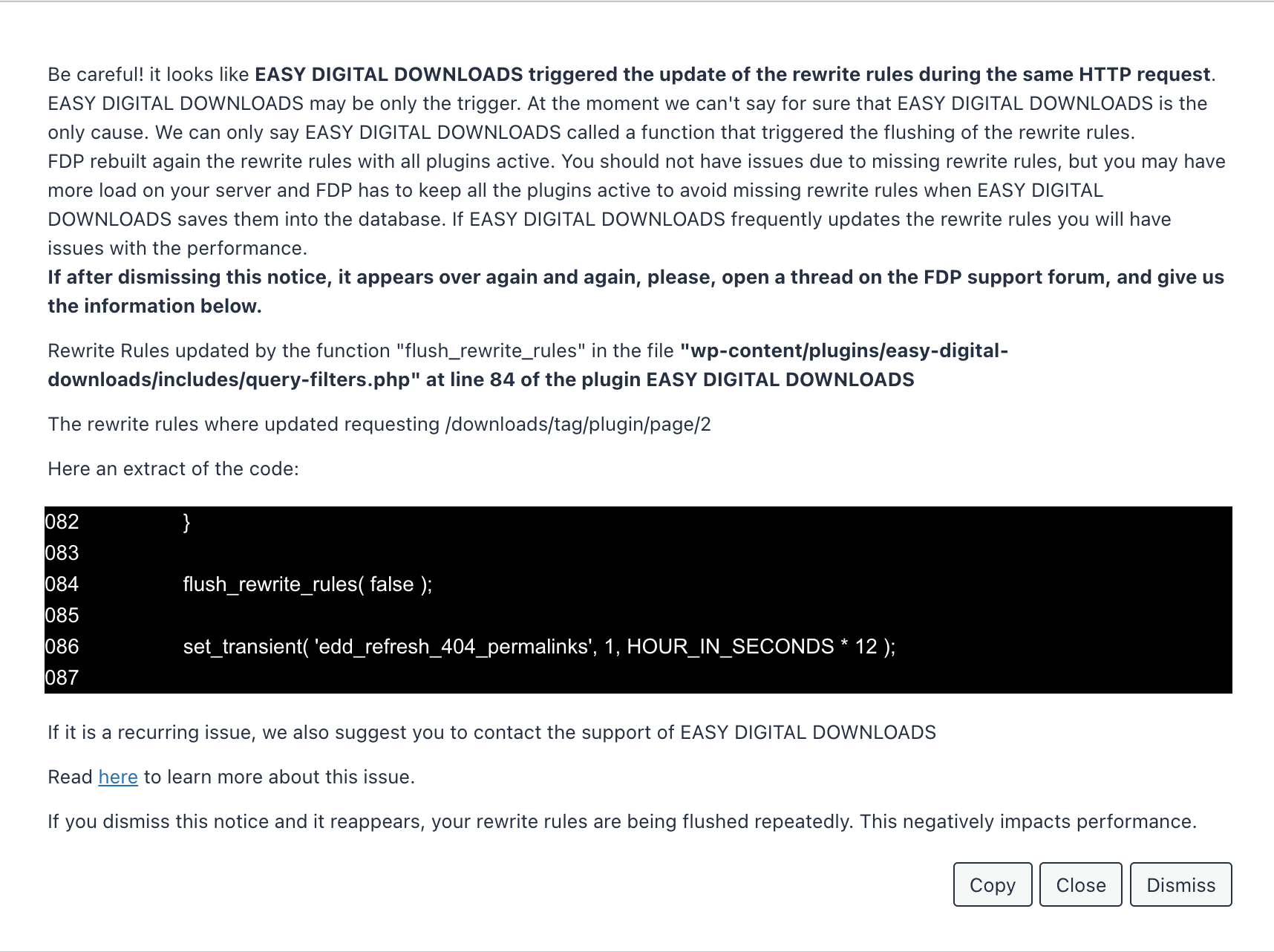
Issue with the rewrite rules.
Click Show details to open the full notice. It includes:
- Which plugin or theme likely triggered the flush
- File path and line number
- A code excerpt
- The URL requested when the flush happened
Use Copy to copy the full message for support or for the plugin author.
Step 4 — Dismiss (optional)
- Close — hides the notice for this session
- Dismiss — hides it for your user account
Important: If you dismiss the notice and it comes back, rewrite rules are still being flushed repeatedly. Dismissing does not fix the underlying issue.
Here you will find an example:
What to do — troubleshooting checklist
1. Confirm the pattern in server logs
Check access logs for:
fdp-refilling-rules=1&action=deactivate&plugin=none
Note:
- Frequency (once vs every few seconds)
- Whether it runs overnight with no real traffic
- User agent
WordPress/...(confirms loopback, not a visitor)
2. Read the FDP notification
Open the Notification Center and note the plugin or theme name in the warning.
That name is the best starting point. It may be the trigger, or one plugin in a chain that leads to the flush.
3. Test whether the notice keeps returning
- Open the rewrite rules notification
- Click Dismiss
- Browse the site normally for a few minutes
- Return to FDP and check the bell icon again
If the notice returns, something is still flushing rewrite rules on an ongoing basis.
4. Isolate the conflicting plugin
Temporarily disable the plugin named in the notification, then retest.
If the name points to a multilingual plugin (e.g. TranslatePress):
- Test with TranslatePress disabled
- Or disable FDP on URLs/languages where TranslatePress runs heavy logic (if your setup allows)
Common suspects reported by users:
- Multilingual / translation plugins
- LMS plugins with custom permalinks
- SEO plugins with aggressive permalink updates
- Plugins that regenerate rules on frontend load (incorrect implementation)
5. Caching plugins (FlyingPress, etc.)
Caching plugins are unlikely to be the direct cause of rewrite rule flushing, but they can:
- Increase background traffic to the homepage
- Make loopback requests more visible in logs
Focus on the plugin identified in the FDP notification first. Fix or reconfigure that plugin so it does not flush rewrite rules on normal page loads.
6. Contact the plugin author
Share the full text from the FDP notification (use Copy).
Ask them to flush rewrite rules only when necessary, for example:
- on plugin activation (
register_activation_hook) - when saving plugin settings that change URLs
Not on every frontend request.
You can link them to: Rewrite rules notice
7. Permalinks sanity check
Go to Settings → Permalinks and click Save Changes once (without changing structure).
This rebuilds rules cleanly. It does not fix a plugin that keeps flushing rules afterward, but it rules out a corrupted ruleset.
8. When contacting FDP support
Include:
- Full rewrite rules notification (copied from Notification Center)
- Example log lines showing
fdp-refilling-rulesfrequency - List of active plugins (especially multilingual and caching)
- Whether the notice reappears after dismiss
- FDP and FDP PRO versions
FAQ
Does this mean FDP is broken?
Not necessarily. The loopback is intentional protection. Continuous repetition means another plugin keeps flushing rewrite rules, and FDP keeps rebuilding them to avoid broken permalinks and 404s.
Will disabling FDP stop the requests?
Yes — the loopback requests are fired by FDP. But disabling FDP removes page-level deactivation and does not fix the other plugin’s behavior. You may still have performance issues or missing rewrite rules from that plugin.
Should I block fdp-refilling-rules in the firewall?
No. Blocking it can leave rewrite rules incomplete and cause 404s or broken URLs. Fix the plugin that flushes rules repeatedly.
Is there an FDP setting to disable this behavior?
There is no recommended setting to disable rewrite rule protection while keeping FDP’s deactivation rules fully safe. The correct fix is to stop the conflicting plugin from flushing rewrite rules on every request.
Can I keep FDP page-level rules while fixing this?
Yes. Once the conflicting plugin is identified and fixed (or its rewrite flush on frontend load is removed), loopback requests should stop or become rare, and FDP will work normally.
Expected outcome after fixing the conflict
| Before fix | After fix |
|---|---|
| Loopback every few seconds, 24/7 | No loopback, or only after legitimate settings changes |
| Rewrite rules notice keeps returning | Notice stays dismissed |
| High server load from self-requests | Normal traffic profile |
| FDP still protects permalinks when needed | Same protection, without a loop |