
Single Post Options
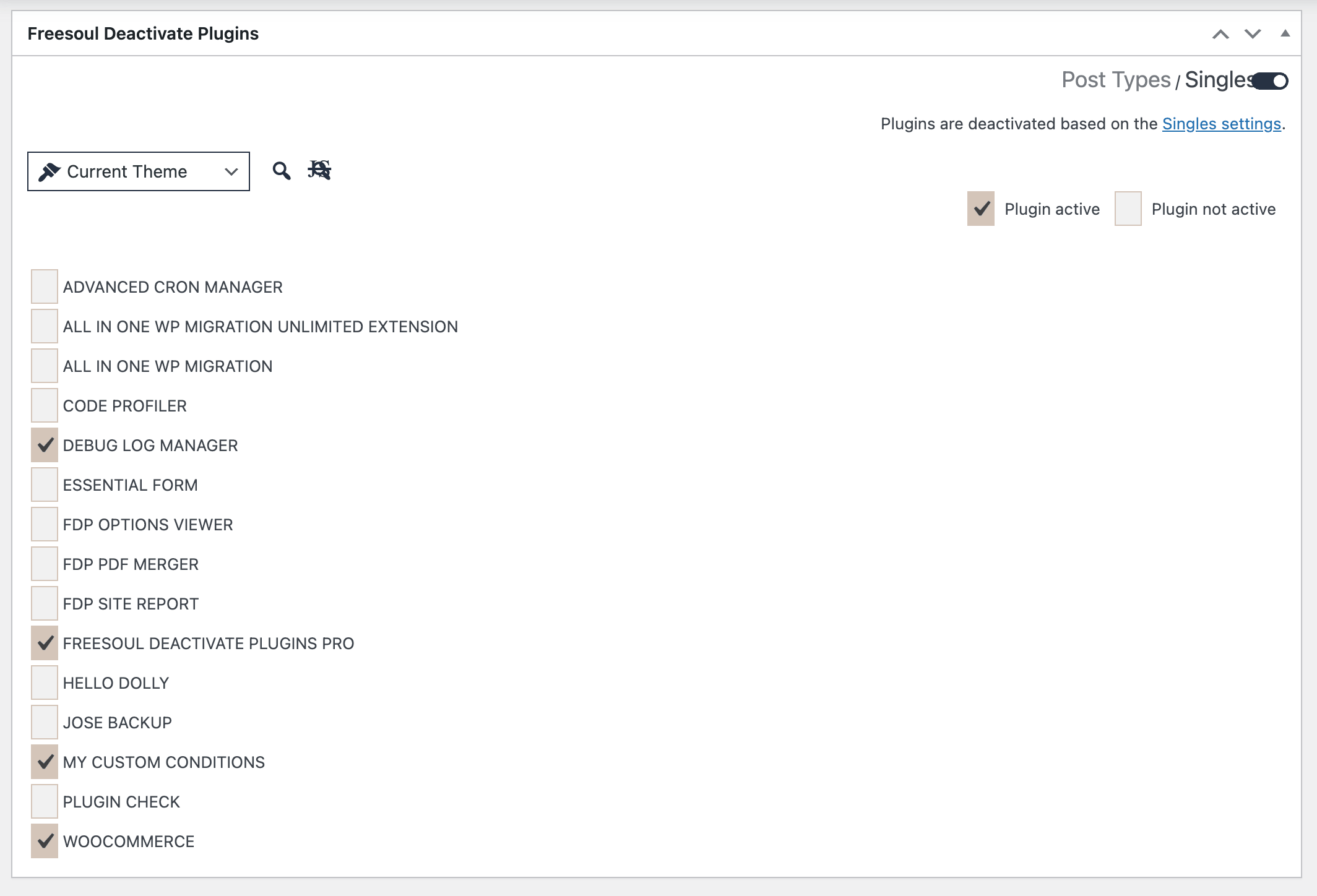
When you edit a post, page, or custom post type item in WordPress, Freesoul Deactivate Plugins adds a metabox to the edit screen. This metabox lets you decide which plugins should stay active for that specific content item and helps you understand whether the current post is using the Post Types rules or its own Singles rules.
This section is especially important when you use both:
- Post Types settings, which apply a general rule to all items of the same post type
- Singles settings, which apply a specific rule to one individual post
The edit screen is where you can quickly see which one is currently in control and switch priority when needed.
Where You Find These Options
Open any post edit screen.
In the FDP metabox you will see:
- a link to Post Types
- a link to Singles
- a lock/unlock control
- the plugin checklist
- preview buttons
- a message telling you whether the current post is currently following Post Types or Singles
The Main Idea
There are two possible levels of rules for a post:
Post Types
These are the general rules for all posts of the same type, such as all blog posts, all pages, or all items of a custom post type.
Singles
These are the rules for one specific post only.
If you only need one common setup for the whole post type, use Post Types.
If one specific post needs a different setup, use Singles for that post.
How Priority Works
The most important thing to understand is that Post Types and Singles can both exist for the same post, but only one has priority at a time.
When the single post has priority
The individual post uses its own settings when the switch is active for Singles. See the following picture.
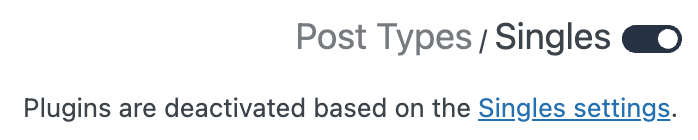
In practical terms, this means the specific post is treated as an exception and its own saved plugin configuration is used.
When the post type has priority
The post uses the general Post Types settings when the switch is unactive and the post type is configured to override Singles.
See the following picture.

In that case, the single post does not act as an exception, and FDP follows the rule assigned to the whole post type.
How To Give Priority To The Single Post
If you are in a situation where Post Types is currently taking precedence, and you want the current post to use its own specific options, you need to make the post use Singles.
You can do that in two ways:
- Activate the switch in the metabox
- Change any plugin checkbox in the metabox
FDP automatically switches the post to the single-post mode when you manually change the plugin selection.
After that, save/update the post.
This is the key rule to remember:
If you want one post to behave differently from the rest of its post type, switch on that post and save it.
How To Return To Post Types Priority
If the post is currently using its own Singles settings and you want it to go back to the general rule of its post type:
- Open the post edit screen.
- Switch off.
- Save/update the post.
After that, FDP will use the Post Types settings again for that post.
What Happens On New Posts
The Post Types page has an option that can set a row as the default for new posts.
When that option is enabled, newly created posts of that type start from the plugin setup defined in Post Types.
This is useful because it gives you a good default baseline for all new content.
Recommended workflow:
- define the common setup in Post Types
- use that as the default for new posts
- override only exceptional posts
The Difference Between “Post Types” and “Singles”
Post Types
Use it to manage the default behavior for all posts of the same type.
- all blog posts
- all pages
- all products
- all events
Singles
Use it to manage one specific content item.
- one landing page
- one product with a special layout
- one post with different plugin needs
What The Status Message Means
The metabox shows which rule FDP is currently using.
- plugins are deactivated based on the Post Types settings
- plugins are deactivated based on the Singles settings
This is the quickest way to understand which configuration has priority.
Best Practice
- Use Post Types for general rules
- Keep them stable
- Use Singles only for exceptions
Important Detail About Manual Changes
If you manually change plugin checkboxes, FDP treats that as a signal to use single-post settings.
Avoid changing them unless you want to override Post Types.
Interaction With Custom URLs
If a Custom URL rule matches, it overrides Post Types and Singles.
Check Custom URLs settings in that case.
Singles Settings
You can find the same type of control also in the Singles settings page.
That page gives you a broader view of individual content items and lets you manage single-post rules outside the edit screen.
While the post edit screen is convenient when you are already working on one specific post, the Singles page is better when you want to review or manage multiple individual pages, posts, from one central place.
The logic is the same: if a post is set to use its own single-item configuration, those settings can override the more general Post Types rule; otherwise, the post continues to follow the post type configuration. In other words, the edit screen metabox and the Singles page are two different entry points to the same single-item behavior, and the switches have exactly the same meaning.
Summary
The metabox lets you choose between:
- Post Types rule
- Singles rule
Switch On = Singles priority
Switch Off = Post Types priority
Best approach: use Post Types as default, Singles only for exceptions.