
Use Post Types Selection In The Current Row
The Post Types action button lets you copy the plugin selection already defined in Post Types settings into the current row. It is useful when you want to start from the default configuration of a post type and then fine-tune only one specific row.
What this button does
When you click the button, Freesoul Deactivate Plugins reads the plugin setup saved for the related Post Type and applies that same selection to the row you are editing.
In practice, the row is reset and then rebuilt so that its plugin checkboxes match the Post Types configuration for that post type.
This is especially useful when:
- You already configured the general rules in Post Types
- You want a single row to start from those rules instead of configuring everything manually
- You need a quick baseline before making row-specific adjustments
Where to find it
Open the action buttons for a row, then look for the button with:
- The category icon
- The PT label
- The tooltip: Get active plugins from the post type settings
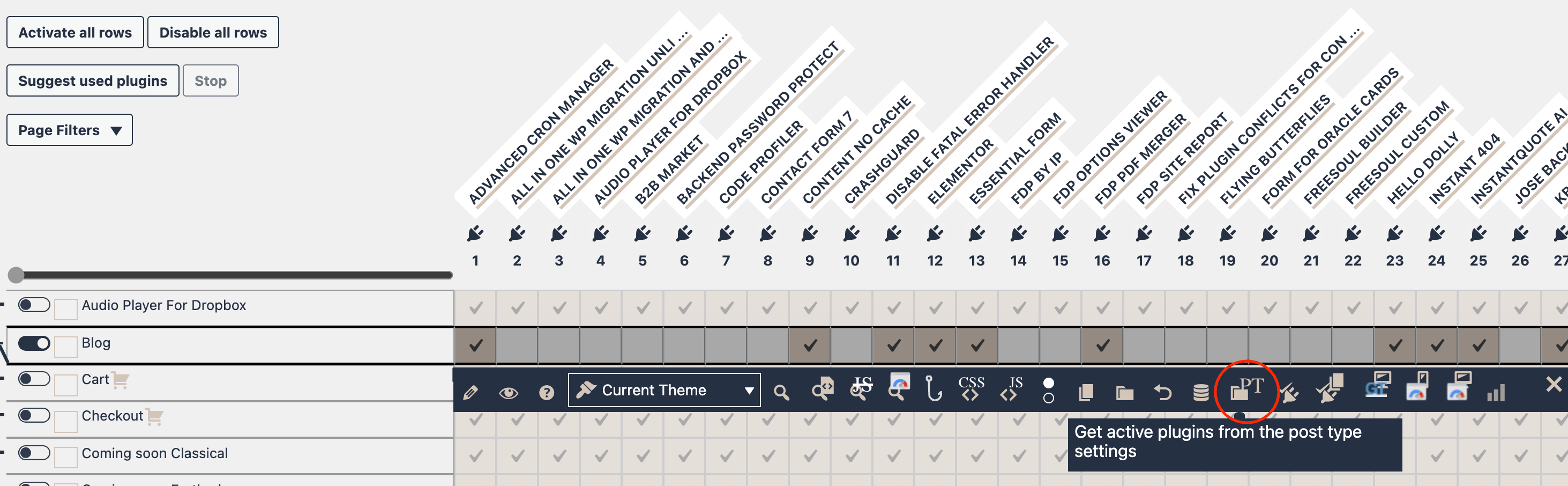
How to use it
- Open the FDP settings page where the row is available.
- In the row you want to edit, open the Action Buttons Bar.
- Click the PT button.
- The plugin selection in that row will be updated to match the settings saved in Post Types for the related post type.
- If needed, manually enable or disable additional plugins for that specific row.
- Save the page to keep the changes.
Typical workflow
A common workflow is:
- Configure the general plugin behavior in Post Types.
- Go to Singles or another row-based settings screen.
- Use the PT button to import that baseline into one row.
- Make only the small differences needed for that specific item.
- Save.
This saves time and reduces configuration mistakes.
Important notes
- The button works on the current row only.
- It does not automatically save the page. After using it, you still need to save your settings.
- It is meant as a copy/import shortcut, not as a permanent live sync with Post Types settings.
- If you change the Post Types settings later, the current row will not automatically update unless you use the button again.
When to use it
Use this button when you want:
- A fast way to recreate the Post Types plugin setup in one row
- A starting point for row-specific customization
- Consistency between general Post Types rules and specific row rules
Example
Suppose your Post Types settings for Pages already define the ideal plugin combination for most pages. If one specific page needs almost the same setup, open its row, click the PT button, and then change only the few plugins that should behave differently.
Best practice
Set up your broad rules first in Post Types, then use the PT button only when a specific row should begin from that same configuration. This is faster, cleaner, and easier to maintain than rebuilding the same selection by hand every time.