
Terms Archives: how to deactivate plugins on specific term archive pages
When a Terms Archive page is loaded, Freesoul Deactivate Plugins will disable plugins according to the Terms Archives settings.
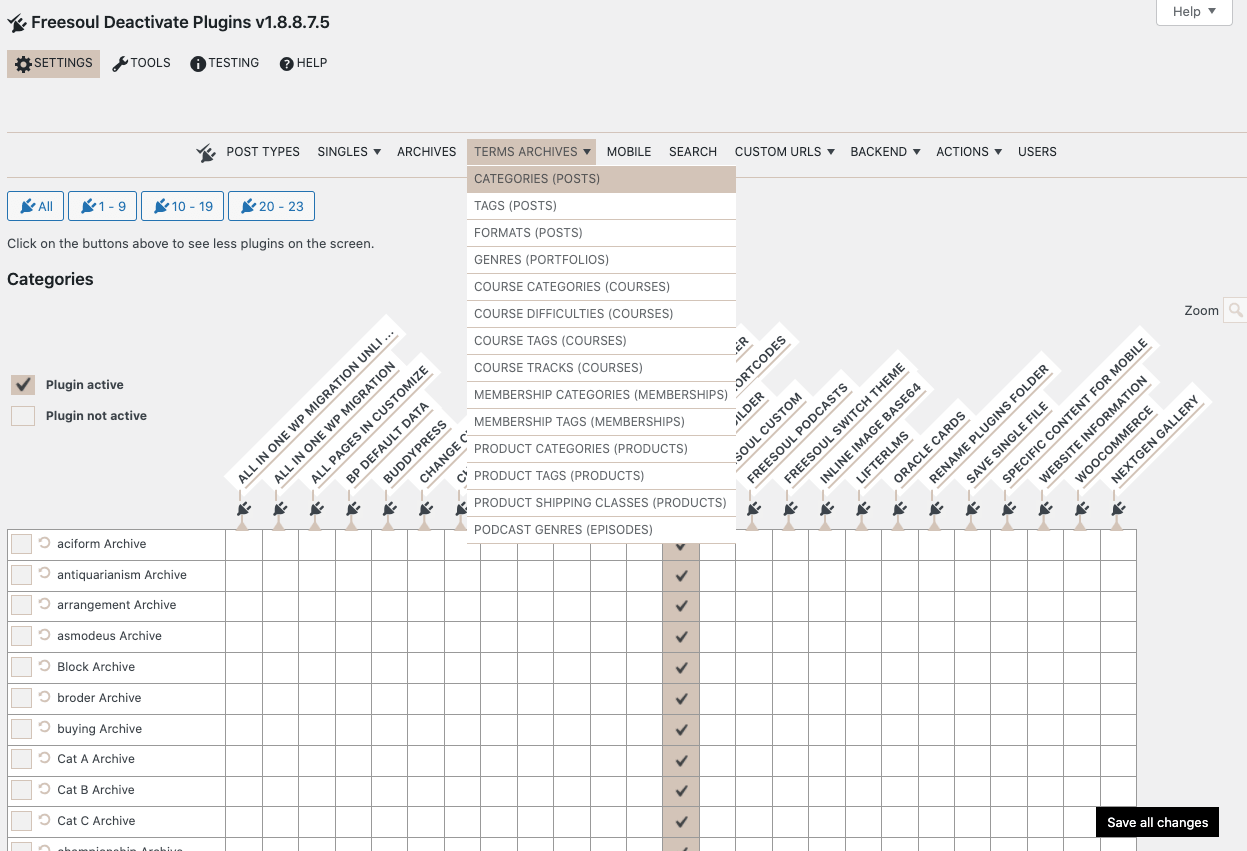
In the example shown above, only Freesoul Builder remains active on the blog post category archive pages. All other plugins are disabled.
In the navigation, you can access the term archive settings for each term to customize plugin activation.
⚠️ Warning for Terms Archives
- Check dependencies: Some term archives rely on specific plugins (like WooCommerce categories or LMS terms).
- Preview before saving: Always test the archive pages after deactivating plugins.
- Start small: Disable only non-essential plugins first, then expand gradually.
✅ Terms Archives setup checklist
- ☐ Identify which term archive pages need plugin deactivation
- ☐ Determine which plugins are essential for each term archive
- ☐ Disable only unnecessary plugins for each term archive
- ☐ Preview each term archive page after making changes
- ☐ Use PRO auto-suggestions if available
- ☐ Document exceptions to handle in Custom URLs
Real-world examples: Terms Archives
- Blog categories: Keep the builder and SEO plugin active; disable unrelated plugins like LMS or e-commerce.
- Product categories (WooCommerce): Keep WooCommerce and essential extensions active; disable unrelated blog or LMS plugins.
- LMS course categories: Keep the LMS plugin and builder active; disable other unnecessary plugins carefully.
Tip: Start with minimal deactivation for term archives and gradually expand after testing functionality.