
Search Settings: how to deactivate plugins on search results pages
In the Search Settings section, you can decide which plugins remain active when the Search Results Page is displayed.
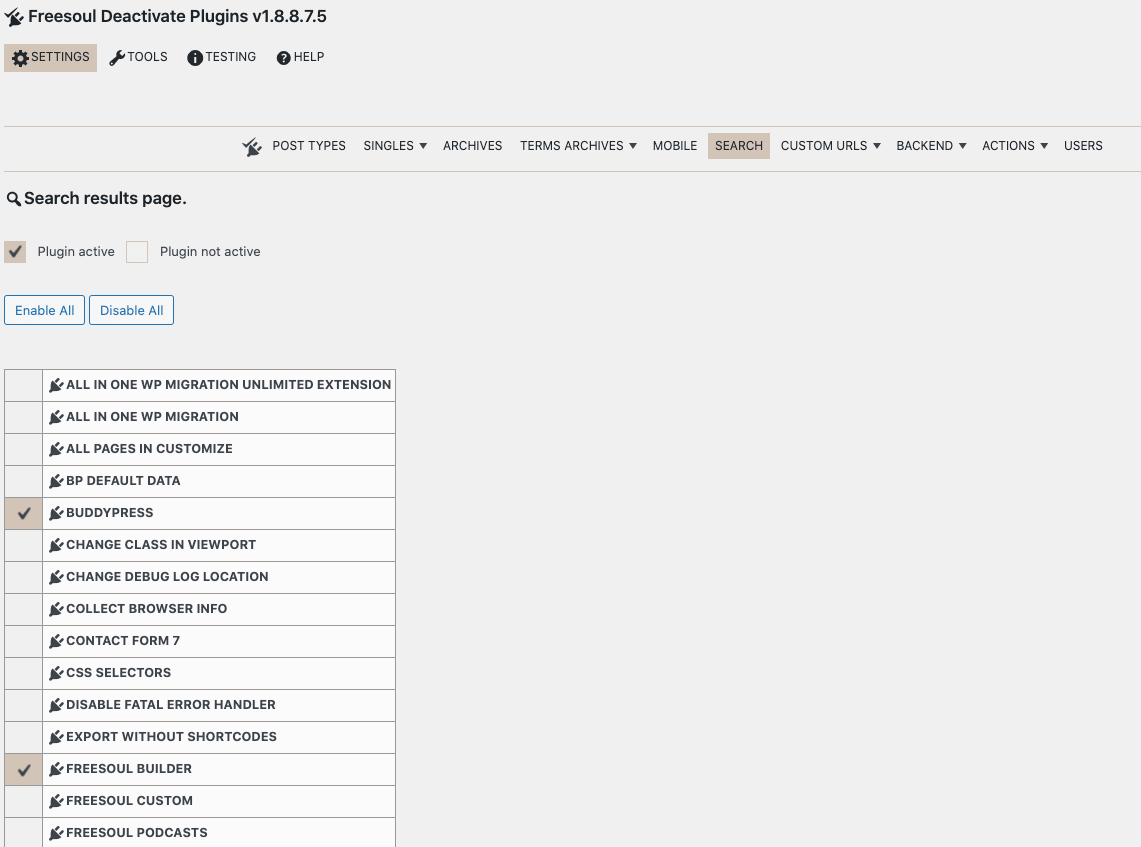
In the example above, only Freesoul Builder and Buddypress remain active on the search results pages. All other plugins are disabled.
It is important to understand which plugins are necessary on the search results page. This depends on the theme you are using. Usually, the search results page displays only post excerpts.
⚠️ Warning for Search Settings
- Test your theme: Some themes use plugins to render excerpts, thumbnails, or custom search layouts. Disabling them may break the page.
- Check plugin dependencies: Ensure essential plugins like page builders, or custom search plugins remain active.
- Preview results: Always check how the search results appear after deactivating plugins.
✅ Search Results Page Checklist
- ☐ Identify which plugins are required to display search results correctly
- ☐ Disable unnecessary plugins to improve page performance
- ☐ Preview the search results page for layout and functionality
- ☐ Test with different search queries
- ☐ Adjust settings if some content or styling breaks
Tip: The goal is to keep only the plugins essential for displaying search results, improving page speed while avoiding layout issues.