
Post Types: how to deactivate plugins for specific post types

In the Post Types section you can decide which plugins should remain active depending on the post type being loaded.
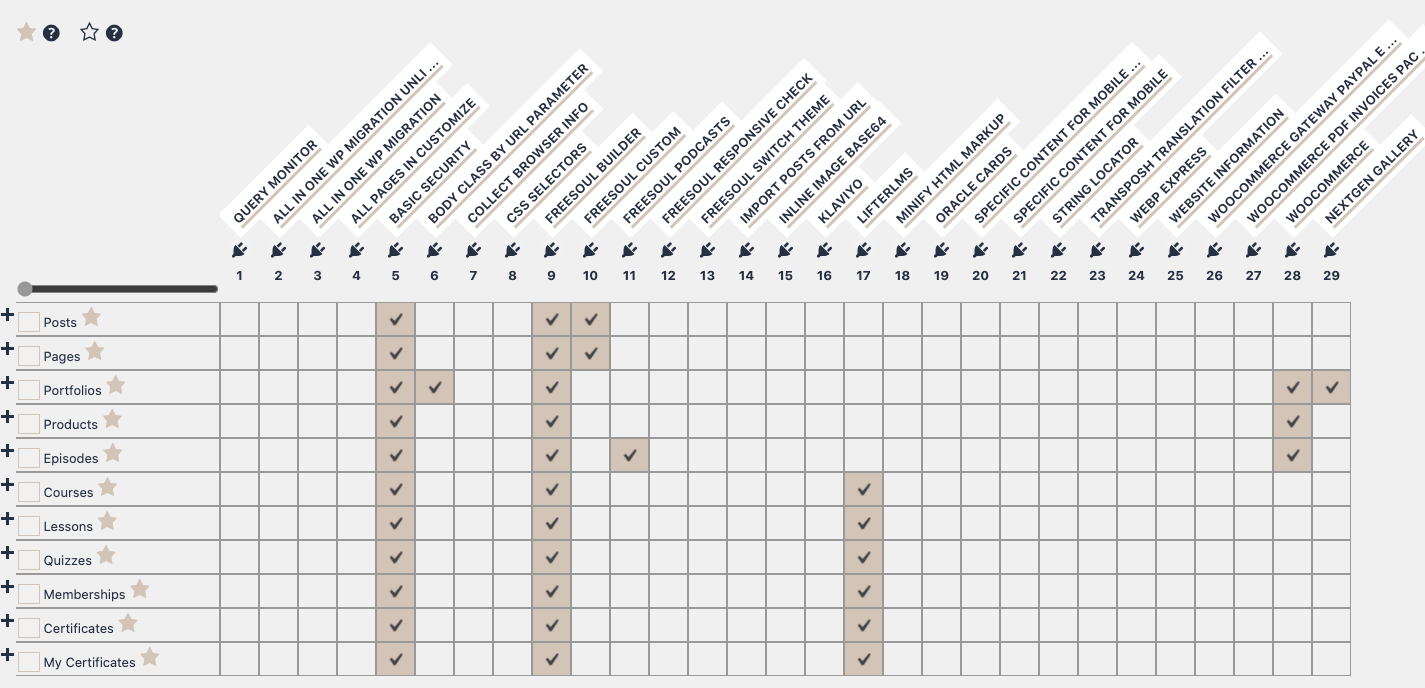
Based on the settings shown above, Freesoul Deactivate Plugins is configured as follows:
- For Pages and Blog Posts, only Basic Security, Freesoul Builder, and Freesoul Custom are loaded. All other plugins are disabled.
- For Lessons, only Basic Security, Freesoul Builder, and LifterLMS are loaded.
- The same logic applies to all other post types.
If a specific page needs a different set of plugins, you can override these settings using the Singles section.
⚠️ Important notes when using Post Types
- Understand the hierarchy:
Post Types provide the base configuration for all pages of that type. Singles or Custom URLs can override them. - Do not disable essential plugins:
Plugins that generate content for a post type (like a page builder, LMS, or WooCommerce) must remain active for that post type. - Be careful with broad deactivations:
Disabling too many plugins on a post type may break multiple pages at once. - Preview changes:
Always preview one or two pages of that post type before applying changes site-wide. - Use Singles for exceptions:
If only a few pages need different plugins, configure them under Singles instead of modifying Post Types.
✅ Post Types setup checklist
- ☐ I identified all post types that need plugin deactivation
- ☐ I verified which plugins are required to generate content for each post type
- ☐ I disabled only the unnecessary plugins for each post type
- ☐ I checked that no page-specific Singles rules are unintentionally overridden
- ☐ I previewed multiple pages of each post type to confirm correct behavior
- ☐ I documented any exceptions to apply via Singles
- ☐ I saved changes only after testing
Tip: Start with Post Types as the base configuration, then override only a few pages using Singles where needed.