
Plugin Dependencies (PRO)
Keeping Plugins Always Active When Another Plugin Is Active
Freesoul Deactivate Plugins PRO allows you to ensure certain plugins remain active whenever a specific plugin is active, regardless of other FDP settings. This is useful for plugins that depend on a main plugin and must not be deactivated accidentally.
How It Works
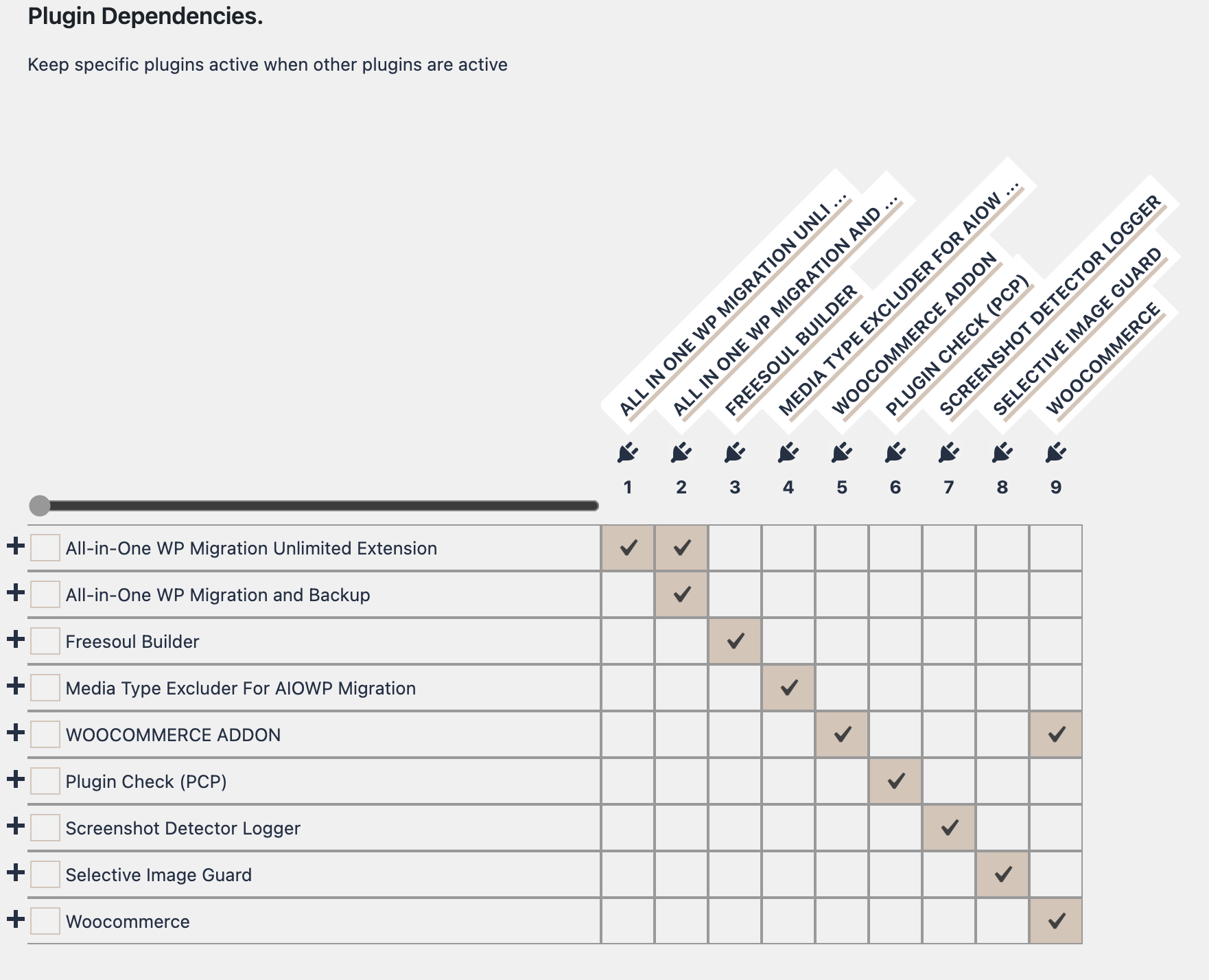
In the backend, FDP provides a matrix interface:
- Rows: Each row represents a plugin installed on your WordPress site.
- Columns: Each column represents another plugin installed.
By checking a box at the intersection of a row and a column:
- You tell FDP that the plugin in that column should always remain active whenever the plugin of that row is active.
- This rule overrides other FDP settings that might normally deactivate the plugin.
Example
Imagine you have a main plugin called “Main Plugin” and two add-ons: “Add-on A” and “Add-on B”.
- In the FDP matrix, locate the row for “Main Plugin”.
- In that row, check the boxes for “Add-on A” and “Add-on B”.
- Click Save Changes.
Result:
- Whenever Main Plugin is active, Add-on A and Add-on B will also remain active automatically.
- Even if other FDP settings would normally deactivate these add-ons, this rule takes precedence.
Benefits
- Prevents dependent plugins from being deactivated by mistake.
- Ensures a stable and consistent environment for plugin ecosystems.
- Works for any combination of plugins installed on your site.
Steps to Configure
- Navigate to Freesoul Deactivate Plugins → Miscellaneous → Plugin Dependencies.
- Locate the row for the main plugin whose dependencies you want to protect.
- Check the boxes for the plugins that should always stay active.
- Click Save Changes.
⚠️ Warning
- Dependency caution: Ensure you correctly identify all dependent plugins, otherwise you may unintentionally deactivate essential functionality.
- Testing: Always verify your site works correctly after saving changes.
✅ Mini Checklist
- ☐ Identify main plugins with dependent add-ons
- ☐ Open FDP Plugin Dependencies matrix
- ☐ Check boxes for dependent plugins that must remain active
- ☐ Save changes
- ☐ Test frontend and backend for errors
Real-world Examples
- Keep all WooCommerce add-ons active whenever WooCommerce is active.
- Ensure a membership plugin add-ons remain active whenever the main membership plugin is active.
- Maintain page builder add-ons active whenever the page builder plugin is active.