
Cron Jobs
How to disable specific plugins during cron activities
You can prevent unnecessary plugins from running during cron jobs to improve performance and avoid potential conflicts.
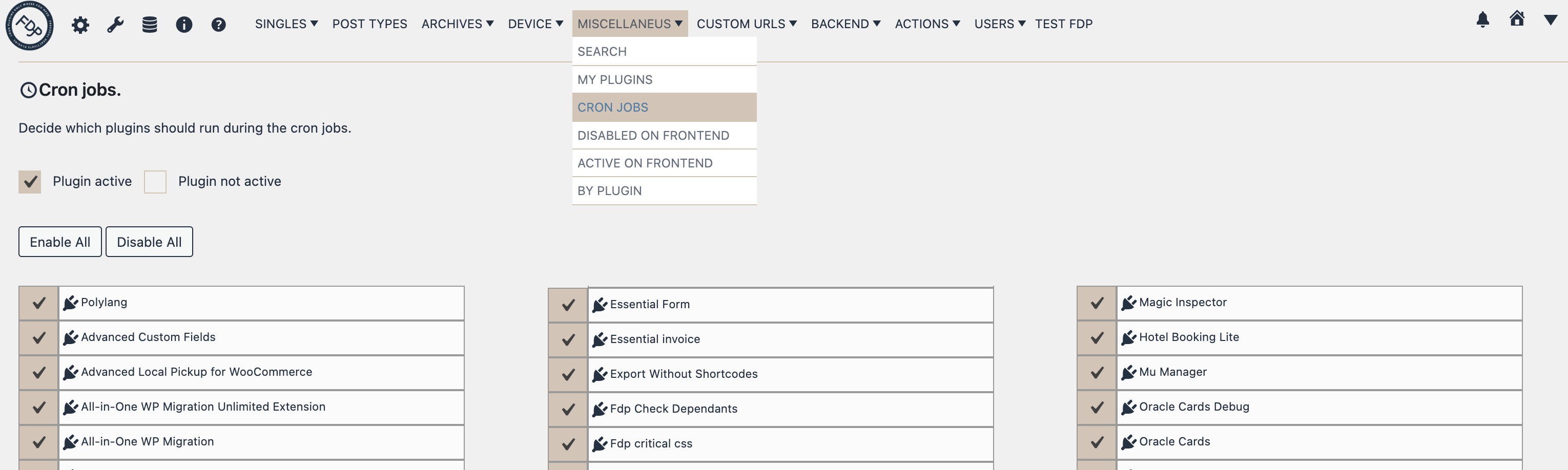
- Go to Freesoul Deactivate Plugins > Miscellaneous > Cron Jobs
- Uncheck the plugins that should not run during the cron jobs
- Save your changes
⚠️ Warning
- Test before disabling: Some plugins may be required for cron-based tasks, like backup or cache clearing plugins.
- Avoid breaking essential processes: Make sure not to disable plugins that your cron jobs rely on, otherwise scheduled tasks may fail.
✅ Cron Jobs Checklist
- ☐ Identify which plugins are essential for scheduled tasks
- ☐ Uncheck only non-essential plugins
- ☐ Save changes and monitor cron job execution
- ☐ Check for errors in logs after making changes
Real-world examples
- Backups: Keep backup plugins active during cron jobs; disable builder, analytics, or frontend plugins.
- Cache clearing: Keep caching plugins active but disable frontend-heavy plugins like sliders or popups.
- WooCommerce updates: Keep WooCommerce and payment plugins active; disable unnecessary admin plugins.
Tip: Disabling unnecessary plugins during cron jobs improves performance and reduces server load.